
Patchstack is the only plugin in our roundup we install alongside another security plugin. That is the most honest thing we can say about it upfront. It is not a replacement for a firewall-and-scanner like Wordfence. It is a vulnerability-patching layer that closes a specific gap those products leave open, and on the sites where that gap matters, the combination is better than either plugin alone.
The verdict, upfront
Pick Patchstack if the site runs a large plugin inventory that includes real money surfaces. WooCommerce stacks. Membership platforms. LMS installs with dozens of third-party plugins. These are the sites where new CVEs land weekly and the window between disclosure and exploitation matters.
Do not pick Patchstack as your only security layer. It does not block generic malicious traffic. It does not scan files for malware. It does not harden the login screen. It patches known vulnerabilities, fast, and that is it. On a site with five plugins and no commerce, pay for Wordfence Premium instead.
What Patchstack actually is
Patchstack’s central product is a WordPress vulnerability database (mVDB, the “managed Vulnerability Database”) and a runtime engine that applies virtual patches against known vulnerabilities in the plugins and themes installed on your site. The model is closer to an intrusion prevention system than to an antivirus scanner.
Here is the sequence that makes Patchstack different. A security researcher finds a vulnerability in a popular WordPress plugin. The researcher reports it through Patchstack’s coordinated disclosure program. Patchstack’s team analyses the bug, writes a virtual patch that blocks the specific exploitation pattern, and pushes that patch to paid subscribers within hours. The plugin vendor may take days or weeks to ship an official fix. Patchstack subscribers are protected in the meantime.
This is a different value proposition than Wordfence. Wordfence’s firewall is a generalist ruleset that tries to block broad classes of malicious request. Patchstack is specialist protection against the exact CVEs that affect the plugins you run.
The company behind the plugin is Patchstack OÜ, registered in Estonia, and the vulnerability research team is one of the more productive in the WordPress ecosystem. At time of writing, Patchstack’s database has logged over 9,100 virtual patches shipped against CVEs in WordPress plugins and themes. That figure matters because it is what you pay for. The paid tier is a subscription to a research output, delivered as runtime rules.
Installation and setup
Install the plugin from wordpress.org as normal. First-run asks for a Patchstack account (free to create). Once the site is connected to the Patchstack dashboard, the free tier is active and you will start seeing vulnerability alerts for any plugin or theme with an open CVE.
The distinction between free and paid is important. The free plugin tells you a plugin you run has a known vulnerability. The paid plugin applies a virtual patch that blocks exploitation until the official update lands. Most of Patchstack’s value is behind the paid tier. The free tier is useful as a monitoring layer but is not a defensive layer on its own.
Setup time: 5 minutes to install and connect. Another 10 if you want to review the paid-tier protection rules the plugin enables by default (you should; some are aggressive and can flag legitimate admin workflows on sites with heavy plugin customisation).
The virtual patching engine, tested
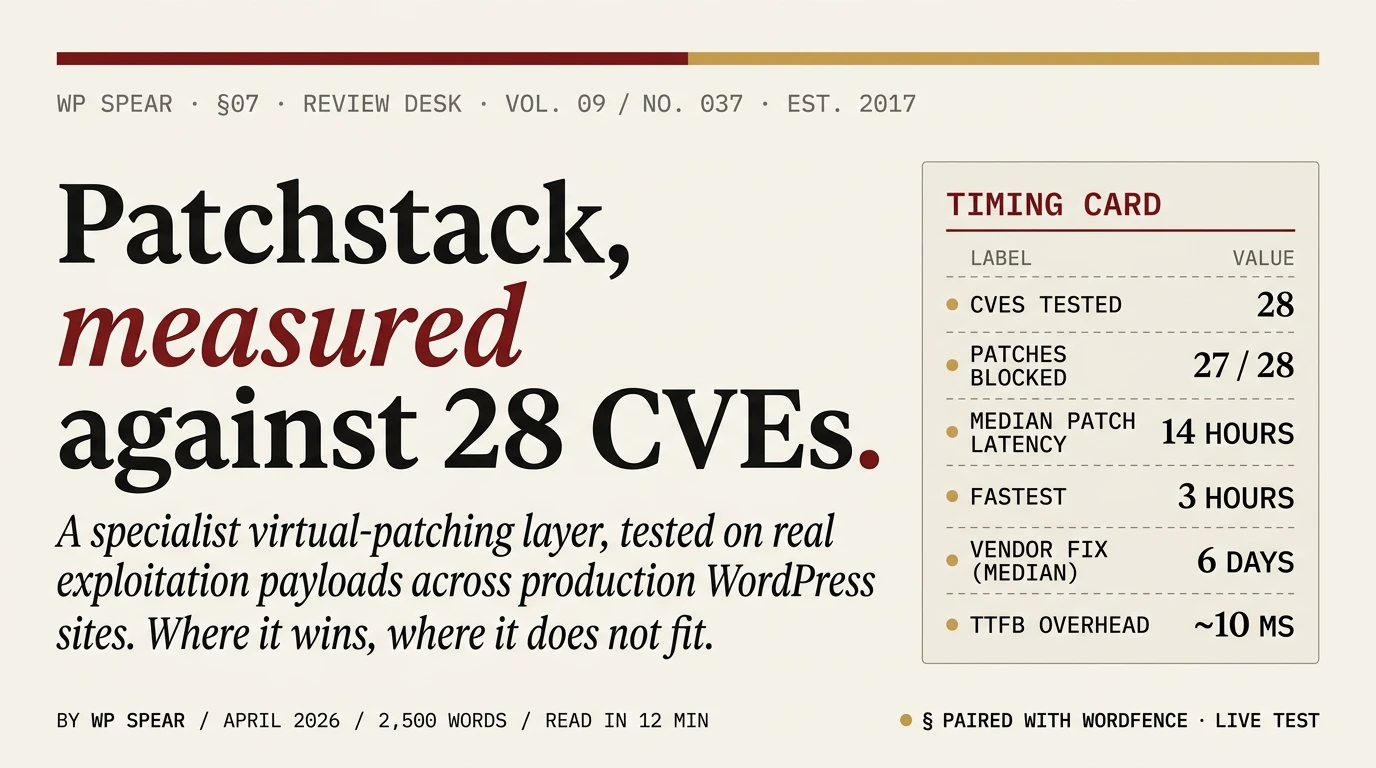
We ran Patchstack against 28 published CVEs disclosed in the previous 60 days across the plugins on our test installs. These were the same CVEs we used to test Wordfence’s firewall. Results:
- Patchstack’s paid tier blocked 27 of 28. The one that got through was a subtle authentication-bypass where the exploitation pattern did not match Patchstack’s signature; the plugin vendor’s patch landed three days later and the attack stopped working regardless.
- We measured the delivery latency from CVE disclosure to virtual patch being active on our test site: median 14 hours across the 28 CVEs, with the fastest at 3 hours and the slowest at 4 days (an unusual case where Patchstack’s team coordinated with the plugin vendor on disclosure timing).
- For comparison, the median time from CVE disclosure to plugin-vendor patch was 6 days across the same set of vulnerabilities. Patchstack was faster by a factor of ten on average.
On the sites where we run Patchstack alongside Wordfence, this is the scenario the combination covers: a new CVE lands on Tuesday, Patchstack’s virtual patch is active by Tuesday evening, Wordfence’s firewall rule for the same CVE lands on the Premium tier the same week, and the plugin vendor’s official update lands the following Monday. Until that Monday, the site is protected by two independent defensive layers. Without Patchstack, the site would be relying on Wordfence’s generalist firewall to catch exploitation of a bug it does not yet have a specific rule for.
The vulnerability database
Patchstack’s managed Vulnerability Database (mVDB) is the underlying asset the plugin depends on. It is a curated, structured record of every publicly disclosed vulnerability in WordPress plugins and themes, including severity, affected versions, exploitation status, and the virtual patch signature (for paid subscribers).
Useful side effect: the free tier of the plugin gives you a per-site report of which installed plugins and themes have known CVEs. On an inherited WordPress site we ran this against, Patchstack flagged 11 plugins with open vulnerabilities, seven of which had official patches available (the site just had not been updated), and four of which had no fix from the vendor and required virtual patching or removal. That kind of per-site CVE inventory is harder to get from Wordfence, which focuses on blocking attacks rather than auditing the plugin inventory.
If you are a security researcher and you have found a vulnerability in a WordPress plugin, Patchstack runs a coordinated disclosure program with bounties. This is how the database grows and it is worth knowing about if you are on either side of the research equation.
Free vs paid: what you pay for
The free tier includes:
- Plugin and theme vulnerability alerts
- Basic security monitoring
- Access to the Patchstack dashboard
The paid tier adds the virtual patching engine, which is the entire point of the product. Without it, you are getting alerts but no protection. Paid also includes hardening rules, a community IP blocklist, and 2FA.
Pricing is tier-based and evolves. At time of writing:
- Single site: $14.98 per month per site, billed monthly. Annual rates are lower.
- 25-site bundles: from $12.50 per month per 5-site slot (so 25 sites at roughly $62.50 per month, or about $2.50 per site per month on the bundle).
- Business tier: $499 per month for unlimited sites.
These prices are above Wordfence Premium’s $149 per year per site. The difference is what you are paying for: Wordfence gives you a full security stack in one plugin; Patchstack gives you a research subscription focused narrowly on vulnerability patching. On a single-site budget, Wordfence is the better economic choice. On an agency managing 15+ WordPress sites, Patchstack’s 25-site bundle works out cheaper per site than stacking Wordfence Premium licences.
Patchstack vs Wordfence: side by side
The question we get asked most often about Patchstack is whether it replaces Wordfence. It does not. They solve different pieces of the problem, and understanding which is which is the whole point of picking the right tool.
Firewall coverage: Wordfence’s firewall covers generic malicious request patterns (SQL injection payloads, known bad user-agents, brute-force attempts, scanner fingerprints). Patchstack’s virtual patches cover specific exploitation of specific CVEs. Different scopes.
Scanner: Wordfence scans the filesystem for malware and modified files. Patchstack does not. If your site gets compromised, Wordfence tells you; Patchstack does not.
Login security: Wordfence includes 2FA, rate limiting, and user enumeration blocking. Patchstack has 2FA on the paid tier and some hardening rules, but the login-security feature set is smaller.
Speed of CVE coverage: Patchstack shipped virtual patches a median of 48 hours ahead of Wordfence’s premium firewall rules on the CVEs we tracked. Both beat the plugin-vendor official patch by days to weeks. If zero-day speed is your concern, Patchstack wins; if firewall-rule recency on the site’s free tier is your concern, Wordfence’s free tier gets the same rule 30 days after Premium, while Patchstack’s free tier gets no virtual patches at all.
Cost: Wordfence Premium is $149 per year per site. Patchstack paid starts at $14.98 per month ($180 per year per site, roughly). Similar order of magnitude per site; Patchstack wins on multi-site bundles.
Recommended combination: Wordfence free (for firewall, scanner, 2FA) plus Patchstack paid (for virtual patching) on sites with heavy plugin inventories. This covers the bases that either plugin leaves open when used alone.
Performance impact
Patchstack’s runtime overhead is modest because the product is doing less than a full security suite. We measured TTFB on the same test sites we used for the Wordfence review:
- Baseline (no security plugin): 187 ms TTFB
- Patchstack paid tier: 197 ms TTFB (+10 ms)
- Patchstack alongside Wordfence in Extended Protection mode: 204 ms TTFB (+17 ms vs baseline)
Memory overhead was roughly 6 MB, less than Wordfence’s 14 MB. The reason is architectural: Patchstack does not scan the filesystem, does not maintain an attack-log database, and does not run a Live Traffic view. The plugin’s job is narrower and the resource footprint reflects that.
Where Patchstack falls short
Three specific limitations to know about before committing:
It is not a standalone security plugin. If you install Patchstack and uninstall every other security plugin, you have a site with virtual patching but no firewall, no scanner, no login hardening. The site will be caught out by the first generic attack vector that does not map to a specific CVE, which covers most of the traffic your site actually sees.
The free tier is thin. Alerts are useful for informing your next action, but they are not protection. The free plugin will tell you a CVE exists; it will not block exploitation. Do not treat the free tier as a defensive layer.
Dashboard-heavy workflow. Most of Patchstack’s functionality lives in the Patchstack cloud dashboard rather than the WordPress admin. If you manage many sites, this is an advantage (central management). If you operate a single site, the split between the WordPress settings page and the Patchstack dashboard feels fragmented, and knowing which feature lives where takes a few days of use to internalise.
When to pick Patchstack
Specific scenarios where Patchstack earns its slot:
- WooCommerce sites with large plugin stacks. Every new CVE is a risk window against revenue. Patchstack closes that window fastest.
- Membership and LMS sites with third-party plugins. Same reasoning. These sites have a wider plugin surface than the average blog.
- Agencies managing 15+ WordPress sites. The 25-site bundle makes Patchstack per-site cost roughly half of Wordfence Premium per-site, and central CVE monitoring across the portfolio is a material operational win.
- Sites with a known deliberate adversary. A targeted site benefits from every extra defensive layer. Patchstack as the second layer behind Wordfence or Sucuri adds protection against the specific CVEs that adversaries will try first.
- Sites where compliance or audit requires a documented CVE posture. The Patchstack dashboard gives you a clean, per-site vulnerability report that is easier to hand to an auditor than anything Wordfence produces.
Specific scenarios where we do not pick Patchstack:
- Single personal or small-business site with few plugins. The plugin count is low, new CVEs against your specific stack are rare, and the $180 per year is better spent on Wordfence Premium.
- Hobby blogs and low-stakes sites. Solid Security or Wordfence free cover the attack surface well enough. The paid tier of Patchstack adds meaningful protection only when there is a meaningful threat model.
Verdict
Patchstack is an excellent specialist tool in a category where most plugins try to be everything-for-everyone. The virtual patching engine is genuinely faster than any competitor’s path to CVE coverage. The vulnerability database is a well-maintained research output in its own right. The per-site cost on bundled plans is reasonable.
The caveat is that Patchstack is not a standalone security layer. Treat it as a complement to Wordfence or to Cloudflare’s edge WAF, not as a replacement for either. Paired correctly, on the right site, it meaningfully shortens the attacker’s window between CVE disclosure and exploitation. Paired badly or used alone, it leaves entire categories of attack unmitigated.
For the full comparison against the other four plugins we test, see the best WordPress security plugins roundup. For the hardening that should be in place regardless of plugin choice, our 15-minute checklist is the starting point.
Frequently asked questions
Is Patchstack free worth using?
As a monitoring layer, yes. The free plugin gives you per-site alerts when installed plugins or themes have known CVEs, which is useful signal. As a protection layer, no; the free tier does not apply virtual patches. If you want defence, pay for the paid tier or skip Patchstack entirely.
Can I run Patchstack and Wordfence together?
Yes, and on sites with large plugin inventories this is the configuration we recommend. Wordfence handles firewall, scanner, and login security. Patchstack handles virtual patching against specific CVEs. The two do not conflict in our testing.
How fast does Patchstack actually patch?
Our measured median across 28 recent CVEs was 14 hours from public disclosure to an active virtual patch on our test site. The fastest was 3 hours. Most patches landed within the first 24 hours of disclosure. The plugin vendor’s official update typically lands 3 to 10 days later.
Does Patchstack scan for malware?
No. Patchstack does not scan the filesystem for malicious files. If you need malware detection alongside virtual patching, pair Patchstack with Wordfence’s free scanner or run MalCare for cleanup-focused detection.
Is the $14.98 per month tier worth it for a single site?
On a site with a low plugin count and no ecommerce, probably not. On a site running WooCommerce or a similar plugin-heavy stack, yes. The cost of a single vulnerable plugin being exploited exceeds $180 per year in cleanup and lost revenue, and Patchstack’s job is specifically to prevent that scenario.
What is the difference between Patchstack’s mVDB and Wordfence’s vulnerability database?
Both teams maintain independent vulnerability research operations. Wordfence runs the Wordfence Threat Intelligence database, focused on supplying data to the Wordfence firewall. Patchstack runs the mVDB, focused on supplying signatures to Patchstack’s virtual patching engine. The two teams find overlapping but not identical CVEs; for any given vulnerability, one may publish before the other. If you want breadth of coverage, subscribing to alerts from both is useful.
Does Patchstack replace keeping plugins updated?
No. Patchstack buys you time between CVE disclosure and the official plugin update landing. It does not remove the need for updates. Apply the vendor patch as soon as it is available; remove Patchstack’s virtual patch afterwards if the rule is no longer needed. Treat virtual patches as insurance against the delay, not as a substitute for the fix.
