
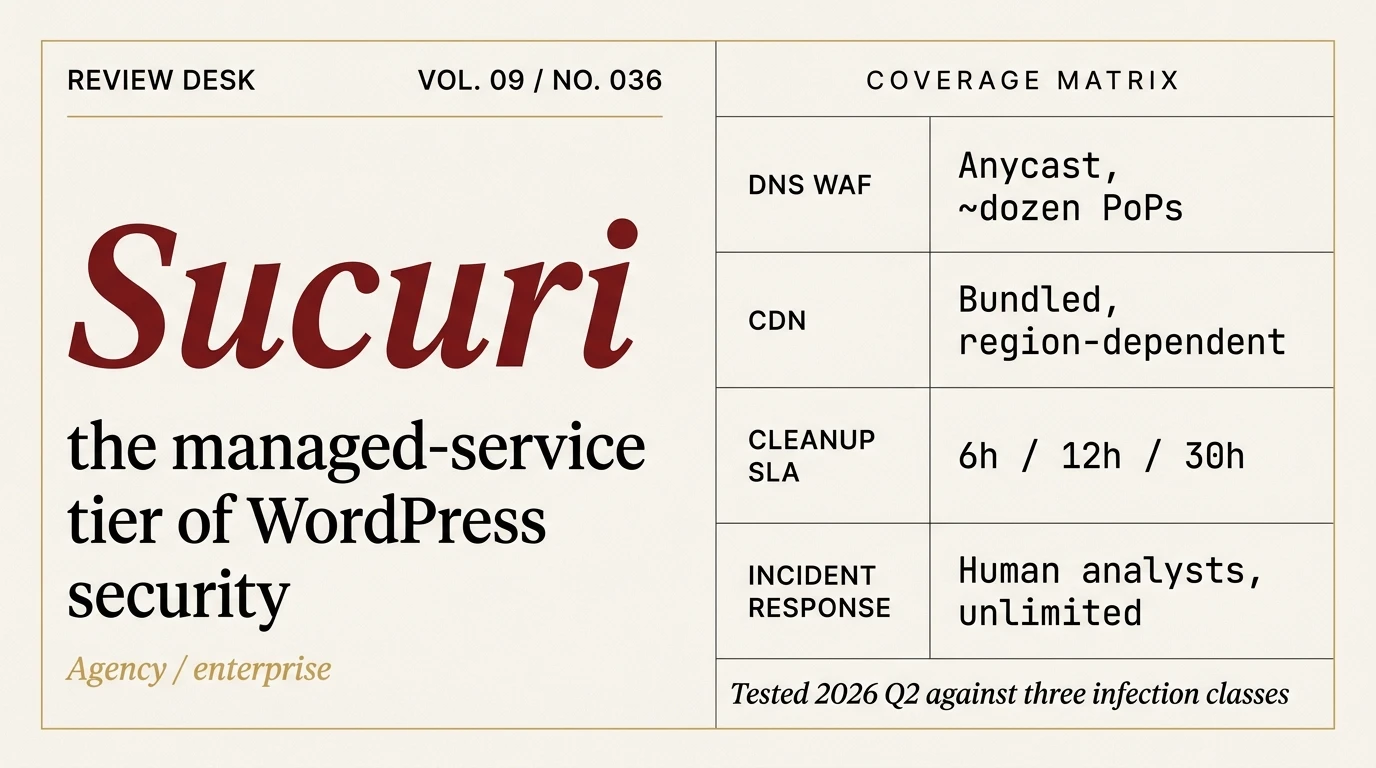
Sucuri is the only plugin on our roster that is not really a plugin. It is a managed service with a WordPress connector attached. You pay for a team of humans to clean up your site if it gets hacked, and a cloud firewall to catch the attacks before they land. Sucuri does not run in your PHP. It runs upstream of your site, on anycast edge nodes, and its best feature is a ticket queue with cleanup analysts on the other end.
The verdict, upfront
Sucuri is the right choice when WordPress security is part of a managed-service stack rather than something you run yourself. Agencies managing dozens of client sites, WordPress operators on shared hosting with no in-house ops, and sites that have already been compromised once and need a guaranteed cleanup pipeline are the textbook Sucuri customer. You are paying for people, not rules.
Sucuri is the wrong choice for small sites where cost matters more than a human on the phone when something breaks. Cloudflare’s free tier plus a well-configured WordPress plugin covers 80% of the same ground at a fraction of the price. If you are managing one site, can follow a security checklist, and are comfortable running a manual cleanup if something goes wrong, Sucuri’s pricing will feel steep for what you get over the free alternatives.
What Sucuri actually is
Three things, sold as a bundle on the Platform tiers and broken apart if you pick the standalone Firewall plans:
- A cloud-based Web Application Firewall that sits in front of your site as a reverse proxy. You point your DNS at Sucuri’s anycast IPs, they inspect and filter incoming traffic, and legitimate requests are forwarded to your origin server.
- A malware scanner and remediation service staffed by actual cleanup analysts who SSH into your site, run removal scripts, and file a post-cleanup report. Unlimited cleanups are included on every Platform tier.
- A CDN and DDoS mitigation layer bundled with the WAF, running on the same edge network.
The WordPress plugin is a thin dashboard for the scanner and an audit-log viewer. Almost everything that matters happens off your server.
Sucuri pricing in 2026
Sucuri’s public affiliate pricing is stale. The numbers below come from the live signup page at the time of writing. Note the $30-$50 increase across the Platform tiers compared to what affiliate blogs still quote.
Platform plans (annual, single site, includes scanner + WAF + unlimited cleanups):
- Basic Platform, $229/year. 30-hour cleanup response SLA, scans every 12 hours, Let’s Encrypt SSL only at the edge.
- Pro Platform, $339/year. 12-hour cleanup SLA, scans every 6 hours, custom SSL certificate upload, advanced SSL support.
- Business Platform, $549/year. 6-hour cleanup SLA, scans every 30 minutes, dedicated support team, custom server configuration.
- Junior Dev, $999.98/year. Five sites, 12-hour SLA. Aimed at freelancers.
- Multi-site, Custom, and Enterprise. Quote only.
Firewall-only plans (WAF without Platform scanner and cleanup):
- Basic Firewall, $9.99/month ($119.88/year). No custom SSL.
- Pro Firewall, $19.98/month ($239.76/year). Custom SSL upload.
The standalone Firewall plans are awkwardly positioned. Basic Firewall costs almost as much as Basic Platform but strips out the cleanup service that is the reason to use Sucuri in the first place. Pro Firewall at $239.76 is more expensive than Basic Platform at $229 and still has no cleanup. If you are evaluating Sucuri, compare the Platform tiers against each other and ignore the Firewall SKUs. They exist mostly to serve customers who already have cleanup handled elsewhere, which is a minority use case.
How the WAF actually works
Sucuri’s firewall is not a WordPress plugin scanning traffic after it arrives on your server. It is a reverse-proxy cloud WAF, which is a fundamentally different architecture. You change your A record (or full DNS) to point at Sucuri’s anycast IPs, Sucuri terminates the TLS connection at whichever edge node is closest to the requesting client, inspects the request, and forwards legitimate traffic to your origin IP. DNS cutover takes 30 to 60 minutes depending on TTL.
The edge footprint is smaller than Cloudflare’s. Sucuri runs somewhere around a dozen or so anycast points of presence across North America, Europe, and East Asia. Named locations in Sucuri’s own docs include Washington D.C., London, Amsterdam, Frankfurt, Paris, Tokyo, and Singapore. The company claims sub-4ms round-trip from anywhere in those three regions. Compare that to Cloudflare’s 330+ city footprint and you see the positioning: Sucuri is selectively distributed, Cloudflare is everywhere.
That selective footprint has a real-world implication. If your traffic is heavily localized to a region Sucuri does not have a PoP near, you are going to eat latency that Cloudflare customers do not. For most English-language WordPress sites serving a US or European audience this is a non-issue. For sites targeting specific under-served regions it can be a dealbreaker.
The origin IP problem
Every reverse-proxy WAF has the same underlying weakness: if an attacker can find your origin IP, they bypass the WAF entirely by connecting directly. Sucuri’s edge never sees the traffic, the rules never fire, and you think you are protected because a browser to the hostname goes through Sucuri.
Origin IPs leak from DNS history services like SecurityTrails, from certificate transparency logs, from email headers if your site sends transactional mail from its own IP, and from any subdomain that is not also proxied. Sucuri’s own documentation recommends restricting origin access with an htaccess rule that allows only Sucuri’s IP ranges. Doing this is not optional if you are using the Sucuri WAF seriously. The same advice applies to Cloudflare users and just as many of them skip it.
Timeouts and IP handling
Two concrete things you will hit within a week of using Sucuri’s WAF:
The edge has a hard 180-second request timeout with no way to change it. Long-running admin operations like large WordPress imports, bulk media regeneration, or some backup plugin operations will hit it. You can work around it by bypassing the WAF for specific admin traffic, but the fact that the limit exists at all is worth knowing before cutover.
All traffic to your origin appears to come from Sucuri’s IPs, not the real visitor. WordPress needs to parse the X-Sucuri-ClientIP header to log real addresses. Most security plugins handle this automatically once you install the Sucuri plugin, but login throttling, geoblock plugins, and analytics that read server-level IPs will need configuration. This is standard for any reverse-proxy CDN and not a Sucuri problem specifically, but it catches people.
The cleanup service, which is the real product
If you take one thing from this review it is that Sucuri’s differentiator is not the WAF. It is the cleanup service. Cloudflare, which is the obvious WAF alternative, has zero equivalent. Wordfence offers Site Cleaning at $179 per incident. Sucuri includes unlimited cleanups on every Platform tier.
The process, from Sucuri’s own docs:
- You open a Malware Removal Request ticket through the dashboard.
- You hand over credentials: FTP, sFTP, SSH, or cPanel. This is a real consideration; analysts get production access to your server.
- A Sucuri analyst connects, runs both manual inspection and their automated remediation scripts, and removes malware.
- Every file modified is backed up before it is touched.
- Tools are removed, a post-cleanup report is delivered, and the ticket closes.
The SLA numbers (30, 12, or 6 hours depending on tier) are time-to-first-response, not time-to-resolution. Sucuri’s docs explicitly say so. On a clean cut-and-dried infection the whole thing can be done in a few hours. On a reinfection with a persistent backdoor the ticket can drag for days. Users on forums report being bounced between the Firewall team and the Cleanup team when the two overlap, which is a real pain point and should be on your mental list when pricing Sucuri against a single-vendor alternative.
The GoDaddy question
GoDaddy acquired Sucuri in March 2017. The acquisition is old enough now that it is part of the product’s DNA rather than news, but it shaped the Sucuri you are evaluating in 2026. Co-founder Daniel Cid, who was the technical face of Sucuri for years, left GoDaddy around 2020. Tony Perez, the other co-founder, departed later. The enterprise-tier product page with PCI DSS support, SIEM integrations, and 1000-plus domain management is the kind of corporate plumbing that only appears post-acquisition.
What this means in practice: Sucuri’s pricing has drifted upward, the product feels less scrappy than it did under founder ownership, and the multi-site management and agency features are better than they used to be. GoDaddy also runs its own branded Website Security product on Sucuri’s engine at a lower price point, which is confusing if you are shopping both brands and relevant mostly if you are already a GoDaddy hosting customer.
Reputation under GoDaddy has not collapsed. Reviews on G2, Trustpilot, and Capterra sit in the 4-star range with a consistent mix of strong cleanup praise and pricing or support-depth complaints. The complaints cluster around a handful of themes worth naming.
The complaints that come up repeatedly
Across Trustpilot, G2, Web Hosting Talk, and the occasional Reddit thread, the same pain points keep surfacing:
The refund policy is narrower than advertised. Sucuri’s site shows a 30-day money-back guarantee prominently. Terms of Service exclude refunds once a Malware Removal Request has been submitted, which is often the reason people signed up in the first place. White Fir Design documented this in 2019 and the policy has not meaningfully changed. If the cleanup does not go well, you are unlikely to get your money back on a product you bought primarily for cleanup.
Support depth on lower tiers is thin. Reports of default “your site is clean” responses without deep investigation into root cause. This gets better on Business and Enterprise where dedicated support is part of the tier, which is itself an argument against Basic Platform for anyone who actually needs responsive people.
No phone support for Platform customers. The listed number does not pick up for most users. Everything is ticket-based. For an enterprise service this is a common friction point.
The Firewall and Cleanup teams are separate. If your issue crosses both (cleanup succeeded but the firewall is blocking the redirector that served the malware, or vice versa) you can end up ping-ponging between tickets.
No two-factor authentication for WordPress users. Sucuri’s own dashboard supports 2FA, but the WordPress plugin does not add 2FA to your WordPress login. This is a gap for a security-branded product in 2026.
None of these are dealbreakers individually. Collectively they tell you what you are actually buying: a competent cloud WAF and a guaranteed cleanup service, packaged by a large company that does not have a culture of going the extra mile on support for $229/year customers.
Sucuri vs Wordfence
This is the comparison most people arrive at, and it is the wrong comparison. Sucuri and Wordfence are different products solving different problems.
Wordfence is a WordPress plugin that runs inside your PHP. Its firewall, scanner, and login protection all live in the same process as WordPress. Its threat intelligence is strong, its scanner is deep, and its free tier is remarkable. Read our full Wordfence review for the detailed breakdown.
Sucuri is a cloud WAF that sits in front of WordPress, plus a human cleanup team reachable by ticket. The scanning it does from inside WordPress is secondary to the remediation service.
If you want prevention (stop attacks before they hit PHP), pick a cloud WAF. Sucuri’s works, Cloudflare’s works, Patchstack’s is built on the Cloudflare edge and works. If you want detection and response once an attack makes it through, Wordfence is the stronger single product. If you want both, pair a cloud WAF (Sucuri or Cloudflare or Patchstack) with Wordfence free on the WordPress side. Running Sucuri alongside Wordfence is fine because they do not meaningfully overlap. Running Wordfence alongside Sucuri is fine for the same reason.
Where Sucuri wins the head-to-head against Wordfence is when you need the cleanup service. Wordfence’s Care and Response plans offer hands-on incident response too, and the Response plan includes site cleaning, but Sucuri bundles unlimited cleanups into every Platform tier starting at $229. For agencies managing client sites where “will eventually get hacked” is a statistical certainty, Sucuri’s cleanup economics are better.
Sucuri vs Cloudflare, which is the comparison that actually matters
Cloudflare’s free tier includes full CDN, DDoS protection, and SSL termination. Cloudflare Pro at $240/year includes WAF, more OWASP rules, and rate limiting. On the pure edge-protection side, Cloudflare matches or beats Sucuri’s Basic Platform at a comparable price, with a dramatically larger PoP footprint (330-plus cities versus Sucuri’s dozen or so), better raw CDN performance, a free tier that is actually usable, and more mature developer tooling.
The honest framing is this. Most WordPress sites should use Cloudflare for the edge layer. Sucuri makes sense when you want human cleanup bundled in, when WordPress-specific WAF rule tuning matters more than raw edge performance, or when you want a single vendor invoice covering both prevention and remediation. The WordPress-specific rule set is a genuine differentiator because Sucuri’s team researches WordPress malware daily and publishes disclosures weekly on the Sucuri blog. Cloudflare’s rules are broader and less WordPress-aware, though the WordPress OWASP managed rulesets have gotten good.
If you are running ten client sites and need a single vendor for firewall plus “call us when it breaks,” Sucuri is a sensible choice. If you are running one site and your budget cares, run Cloudflare free or Pro and keep our malware removal procedure open as the fallback plan.
Performance, briefly
Sucuri’s CDN is not the fastest on the market. Independent CDN benchmarks from Marketing Scoop and NOC.org consistently show Cloudflare outperforming Sucuri on connect time and time-to-first-byte from multiple geographies. Sucuri is competitive, not dominant.
The edge caching is fine for static assets. For WordPress sites where most traffic hits cache anyway, the difference between Sucuri’s CDN and Cloudflare’s rarely shows up in real user metrics. If you are running a site where every millisecond of TTFB is measured (ecommerce at scale, ad-tech landing pages), Cloudflare or a specialist CDN is the better choice and you should use Sucuri for the cleanup and WAF, not the CDN.
Reliability, based on the public incident record
Sucuri publishes an uptime status page at status.sucuri.net with an incident history. In the 90 days leading up to this review, five WAF or dashboard incidents logged with a median duration near five hours. Examples from the last year: a multi-hour WAF dashboard connectivity issue in December 2025, a one-day-plus WAF outage in North America West in August 2025, and a malicious-traffic event affecting European clusters in early April 2026. For a WAF provider this is a non-trivial record. It is not worse than most WAF competitors. It is worse than a well-tuned Cloudflare deployment will give you. Plan for it.
Who Sucuri is actually for
After running Sucuri on test installs and comparing it against the rest of our plugin roster, four profiles make sense:
Agencies with client-site portfolios. The unlimited cleanups across a portfolio of 10-plus sites is the strongest economic argument for Sucuri. The alternative is either paying Wordfence per-incident on every client site or building an in-house cleanup capability. Sucuri’s multi-site and agency tiers exist specifically for this workload.
WordPress sites already compromised and expected to be again. If you have hit one pharma hack already and the attack surface has not changed meaningfully, the cleanup bundle is insurance that pays for itself the second time it is needed.
Sites on shared hosting with no in-house ops. If your hosting is GoDaddy or SiteGround or any shared host where you do not have SSH access and cannot run a manual cleanup, Sucuri is effectively outsourcing the ops you do not have.
Enterprise WordPress deployments. The custom Enterprise tier with PCI DSS, SIEM integrations, API automation, and dedicated account management is a legitimate enterprise product in a category where most WordPress security tools are not.
If any of those four profiles fit your stack, the cleanup service alone pays for the platform tier on the first incident. Visit Sucuri
If none of those profiles fit you, you are probably better served by Cloudflare plus a plugin from our roundup and an incident-response plan that starts with our malware removal guide.
Bottom line
Sucuri is a competent cloud WAF attached to a legitimate cleanup service, priced higher than the alternatives because you are paying for human hours. The WAF is not the best on the market. Cloudflare is faster, cheaper, and more feature-rich for pure edge protection. The cleanup service is the reason Sucuri exists as a viable product in 2026, and if cleanup is not part of what you are buying, you are buying the wrong tier.
For agencies and operators who need a single vendor handling prevention and remediation, Sucuri earns its place. For everyone else it is worth understanding what Sucuri is so you can make an informed choice to use something cheaper.
Check current Sucuri pricing, or read how it stacks up in our best WordPress security plugins roundup. For the security work that should happen on any WordPress site regardless of which vendor you pick, start with the 15-minute security checklist.
Frequently asked questions
Is Sucuri worth it in 2026?
For agencies, enterprise sites, and WordPress operators who want bundled human cleanup, yes. For single sites on a budget, Cloudflare plus a security plugin delivers most of the WAF value at a fraction of the cost. Sucuri’s premium is for the cleanup service and the account management, not the firewall.
How does Sucuri compare to Cloudflare?
Cloudflare has a larger edge footprint (330-plus cities versus Sucuri’s dozen-ish), better raw CDN performance, a usable free tier, and broader developer tooling. Sucuri has WordPress-specific WAF rules, unlimited human cleanups bundled in, and a single-vendor invoice. For most WordPress sites Cloudflare wins on cost and performance. For sites that need cleanup guaranteed, Sucuri wins.
Does Sucuri slow down my WordPress site?
Usually no, sometimes yes. For audiences in regions Sucuri covers well (North America, Europe, parts of Asia) the edge caching speeds things up versus a no-CDN baseline. For audiences in regions where Sucuri has no nearby PoP, the added hop through Sucuri’s anycast network can add latency. The 180-second timeout also bites on long-running admin operations.
Is Sucuri still independent after the GoDaddy acquisition?
No. GoDaddy acquired Sucuri in March 2017. Founders Daniel Cid and Tony Perez have both left. Sucuri runs as a GoDaddy product with its original brand and some of its original engineering culture, but it is no longer an independent company.
Can I get a refund if the cleanup does not work?
Probably not. Sucuri advertises a 30-day money-back guarantee prominently, but the Terms of Service exclude refunds once a Malware Removal Request has been submitted. Since cleanup is the primary reason most people buy Sucuri, this is a real gotcha. Read the ToS before purchasing.
Does the Sucuri plugin protect my site on its own?
No. The free Sucuri plugin adds file-integrity monitoring, an audit log, and basic hardening. It does not include the WAF or the cleanup service. Those are paid features that live on Sucuri’s servers, not in the plugin. The plugin alone is a monitoring tool, not a security solution.
What happens if Sucuri has an outage?
Depends on the outage. If Sucuri’s edge goes down entirely, traffic fails closed and your site is unreachable. If only the dashboard is down but the WAF is up, your site keeps serving but you cannot see logs or manage rules. Sucuri’s 90-day incident record includes multiple WAF and dashboard incidents with median duration near five hours. Plan for this by keeping your DNS provider’s panel accessible so you can bypass Sucuri in an emergency.
Can I run Sucuri and Wordfence together?
Yes and it is a reasonable setup. Sucuri is the cloud-edge WAF and the cleanup service. Wordfence runs inside WordPress for deeper scanning and on-server detection. They do not meaningfully overlap. The cost is two subscriptions, and you should pick one to be the primary source of truth for alerts. For most people Cloudflare plus Wordfence is a better-performing and cheaper version of the same pattern.
