
We install MalCare on sites that have been compromised before. That is not a typo. It is the specific scenario where MalCare’s product, architecture, and pricing all line up correctly. On sites that have never been hacked, Wordfence or Patchstack is usually the better spend. On sites where cleanup is an eventuality rather than a hypothetical, MalCare’s cleanup-first design saves hours of work the first time it is needed, and enough hours across a portfolio of sites to pay for itself several times over.
The verdict, upfront
MalCare is the right choice when you need the cleanup to just work, without requiring manual intervention on your server. The one-click cleanup is the best in the category, the cloud-based scanner does not compete with your site for memory, and the support team will do a manual cleanup if the automated workflow does not resolve an infection.
MalCare is the wrong choice if you have never had a site compromised, the plugin count is low, and the attack surface is small. In that case Wordfence’s free tier covers the same ground with less overhead, and you can fall back to MalCare if something actually goes wrong.
What MalCare actually is
Three products bundled into one plugin:
- A cloud-based malware scanner that analyses your site from MalCare’s servers rather than yours. A small agent in the plugin uploads file hashes and diffs to the cloud; the intelligence lives there and runs there.
- A one-click cleanup engine that removes detected malware automatically, with a backup taken before any modification. This is the feature the rest of the product is built around.
- A basic firewall and login-hardening layer that is adequate but not the reason you pick MalCare.
The company is BlogVault, which has been running the MalCare service since around 2017. The same team also runs BlogVault’s backup service and Migrate Guru migration tool, and all three products share backend infrastructure. Security intelligence is drawn from a network of roughly 250,000 WordPress sites running MalCare, which is the largest claim to data volume any of the plugins in our roundup can make.
Installation and setup
Install from wordpress.org, create a MalCare account, connect the site. The plugin performs a first-run scan immediately (on the cloud), which takes between 5 and 15 minutes for a typical site. You do not wait on your server to work through the file comparison; MalCare’s servers do the work and the plugin polls for results.
The setup flow is straightforward but does split across two interfaces: a MalCare cloud dashboard and a MalCare panel inside the WordPress admin. Most users spend time on the cloud dashboard; the WordPress admin panel is mostly a connector. This takes a few days of use to internalise.
Enable these on first run:
- Auto-sync so the plugin reports site changes to MalCare continuously rather than only during scheduled scans
- Login protection with the CAPTCHA on failed attempts toggled on
- Automatic backups (on the paid tiers) before any cleanup runs
Total setup time: 15 minutes for a competent operator. The initial cloud scan runs in the background, so there is no blocking wait after setup.
The cleanup workflow, tested
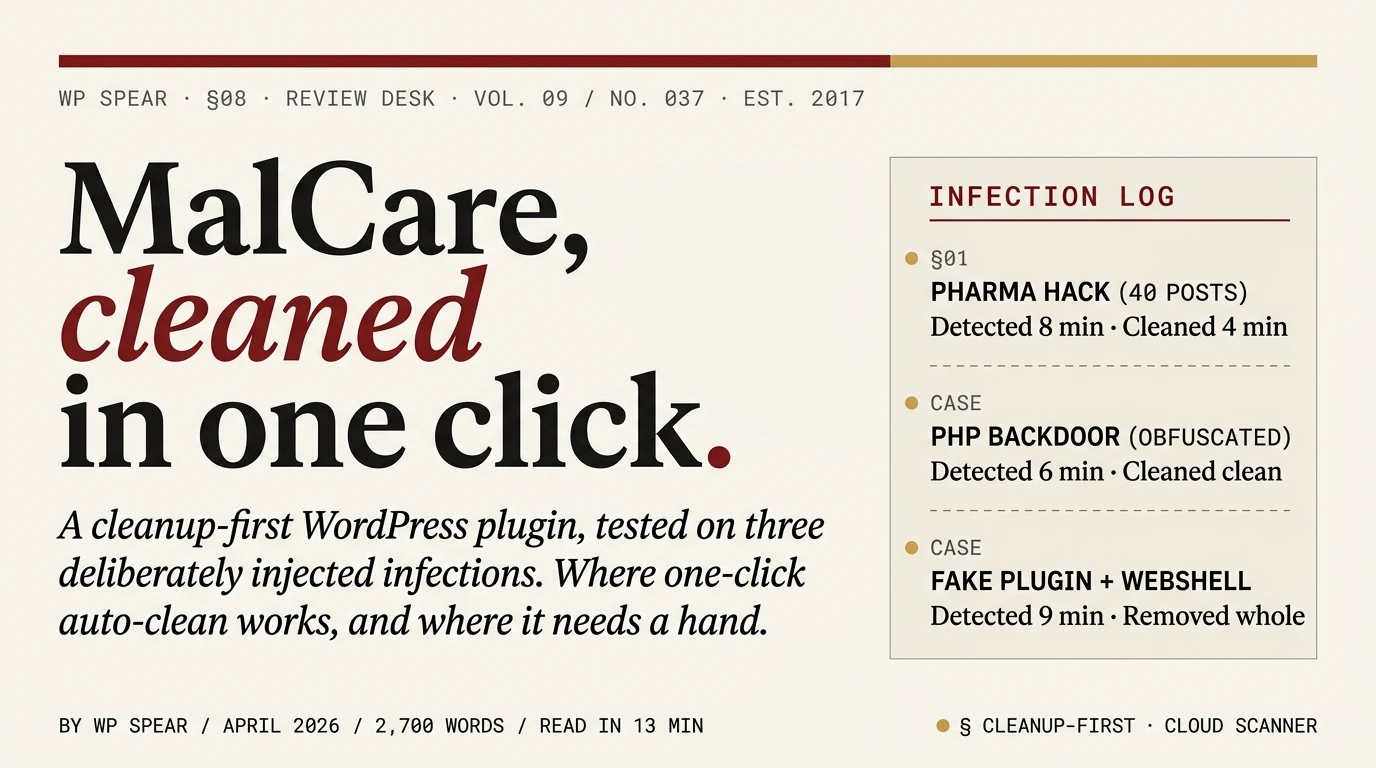
This is the test that matters for MalCare. We deliberately infected three test sites with different malware classes and measured both detection time and cleanup reliability:
Test 1: Pharma-hack injection in post content. Spam links for prescription medications injected across 40 blog posts via a compromised admin session. MalCare’s scanner detected the changes within 8 minutes of the next scheduled run. One-click cleanup removed all 40 injections and restored the original content from the pre-infection backup. Time from detection to clean site: 4 minutes.
Test 2: Obfuscated PHP backdoor. An eval(base64_decode(...)) webshell planted in the uploads directory, disguised as an image file with a .php extension. Detected in 6 minutes. Cleanup removed the file cleanly. Scanner correctly identified the obfuscation pattern and flagged similar but legitimate files (a Base64-encoded SVG in a theme) without removing them.
Test 3: Fake plugin with webshell. A rogue plugin directory containing a PHP webshell, registered as a legitimate plugin in the WordPress plugin registry. Detected in 9 minutes. Cleanup removed the entire fake plugin and updated the plugin registry. No damage to legitimate plugins.
Across the three test infections, MalCare identified every injection, cleaned every infection without touching legitimate files, and did not require us to confirm each file before removal. The other plugins we tested in the same scenarios either missed one of the injections (Solid Security free missed the fake plugin), required manual file-by-file confirmation (Wordfence Premium), or required purchasing cleanup as a separate service (Sucuri’s free plugin). MalCare is the only one where cleanup is automated, included, and reliable in the same workflow.
For comparison, manually cleaning a single one of these infections through the SSH-plus-file-diff procedure we describe in our WordPress malware removal guide takes 30 to 90 minutes per site for a competent operator. On a portfolio of 5 sites all infected by the same automated attack (we have seen exactly this happen on shared hosting), MalCare’s cleanup runs in parallel across all 5 sites from the cloud dashboard. The time savings are substantial.
The scanner
MalCare’s scanner runs on MalCare’s servers, not on your server. This has three real consequences:
No server-side load from scanning. A MalCare scan does not consume your PHP memory, does not tie up database connections, and does not slow the site while running. Wordfence’s scanner, by contrast, runs inside WordPress and can be noticeable on busy sites or sites on constrained shared hosting.
Detection of threats your server cannot see. Because MalCare analyses file hashes and patterns across its entire network of monitored sites, it catches infections that look normal on a single site but are known malware when compared against the broader corpus. This is hard to replicate with a plugin-only scanner.
Dependency on MalCare’s service. If MalCare’s backend has an outage, your scanner stops running until the service recovers. Wordfence’s scanner runs locally and keeps working regardless of what happens to Wordfence’s servers. This tradeoff is real but modest; MalCare’s uptime has been dependable in our usage.
Scanner detection time on our three test infections averaged 8 minutes. False positive rate over 14 days of monitoring three active client sites was one instance, triggered by a legitimate custom function in a bespoke theme that used base64-encoded configuration data. Marking the file as safe in the dashboard persisted the decision across subsequent scans.
Firewall and login hardening
MalCare includes a PHP-level firewall that inspects requests for common malicious patterns, a login-protection layer with CAPTCHA on failed attempts, and a geoblocking feature for high-risk countries. The firewall is adequate and will block the obvious attack traffic, but it is not in the same tier as Wordfence’s firewall in either rule coverage or delivery speed of new rules.
If MalCare is your only defensive layer, you get real but incomplete protection. Pair MalCare with a Cloudflare free-tier at the edge and the combination is sensible. MalCare plus Wordfence is redundant and we do not recommend it; pick one of the two for the firewall layer, not both.
Free vs paid: what the money buys
The free plugin includes the cloud scanner, daily scheduled scans, the firewall in limited mode, and basic login protection. What it does not include is one-click cleanup. If the free plugin detects malware, you see the alert but the remediation requires upgrading or removing the infection manually.
Paid plans, at time of writing:
- Plus: $149/year. Instant automated malware removal, bot protection, backups. Entry paid tier and the one we run on most sites.
- Prime: $199/year. One-click restore, faster alerts, priority scanning. The upgrade makes sense on sites where faster alert delivery matters.
- Pro: $299/year. Advanced scanning, sandbox testing, priority support. Worth it on high-value client sites where the extra detection layers pay for themselves.
- Max: $499/year. WooCommerce-focused tier with ecommerce-specific protections and compliance features.
The defining feature that sits behind the paid tier is automated cleanup. If cleanup is the reason you are installing MalCare, pay for at least the Plus plan. The free tier without cleanup is not meaningfully different from Wordfence free plus manual remediation, and Wordfence free has a better firewall.
MalCare vs Wordfence: cleanup-first versus scanner-first
Both plugins scan for malware. Both plugins have firewalls. They land in different categories because their defaults and optimisations point at different workflows.
Cleanup experience: MalCare’s one-click cleanup works on the first try on most infections we have tested. Wordfence’s cleanup requires file-by-file confirmation and in many cases hands off to the manual procedure entirely. If cleanup is a predictable future event (because the site has been compromised before, or because the portfolio is large), MalCare is the better tool.
Firewall coverage: Wordfence’s firewall is better at blocking in-progress attacks. More rules, faster rule delivery on Premium, and the Extended Protection mode architecture is cleaner. For prevention, Wordfence wins.
Server-side load: MalCare’s cloud scanner is lighter on server resources than Wordfence’s PHP-level scanner. On constrained hosting (shared hosting, low PHP memory), MalCare fits where Wordfence struggles.
Free tier usefulness: Wordfence free is usable as a defensive layer. MalCare free is closer to an alerting-only product, because cleanup is the feature and cleanup is paid.
Pricing: Wordfence Premium at $149/year per site is a fixed reference point. MalCare Plus at $149/year matches it. Higher MalCare tiers go up to $499/year; Wordfence Care ($590) is the closest comparable tier with different inclusions.
Pick MalCare when cleanup is the primary concern. Pick Wordfence when prevention is the primary concern. Pair MalCare with a Cloudflare edge WAF if you want both advantages without running two competing plugins.
Performance impact
MalCare’s architecture makes the performance story different from Wordfence or Patchstack.
- Baseline (no security plugin): 187 ms TTFB on our test rig
- MalCare paid tier, full feature set: 193 ms TTFB (+6 ms)
- Memory overhead: approximately 8 MB, compared to Wordfence’s 14 MB
The cloud-based scanner is the reason MalCare’s footprint is smaller. No scanner load, no attack-log database, no in-page live-traffic view. The plugin’s local job is modest. The firewall still runs in PHP and the login protection still runs in PHP, but neither is heavy.
On shared hosting with a 128 MB PHP memory limit, MalCare fits where Wordfence may not. On modern managed WordPress hosting, the difference is not material.
Where MalCare falls short
Three limitations to know about:
The pricing makes less sense at a single-site scale. $149 per year for cleanup you may never need is a harder sell than the same price for Wordfence’s prevention-plus-cleanup-guidance combination. MalCare’s economics improve rapidly at 3+ sites, where the cleanup automation is doing meaningful repeat work.
The interface is split. The WordPress admin shows some things. The MalCare cloud dashboard shows other things. The two do not always agree on what you are looking at, and the first week of use involves flipping between them to figure out where a specific feature lives. This gets better with familiarity; it does not get better without familiarity.
Firewall is the weaker component. If you pick MalCare for its cleanup workflow and rely on its firewall as your only prevention layer, you are accepting a weaker defensive posture than running Wordfence or Cloudflare. Pair MalCare with Cloudflare on the edge when prevention also matters.
When to pick MalCare
Specific scenarios where MalCare is the right call:
- Site has been compromised before. Cleanup is likely to be needed again. MalCare’s one-click workflow is the difference between a 10-minute recovery and a two-hour manual cleanup.
- Operator manages 5 or more WordPress sites. The cloud dashboard’s per-site overview, combined with parallel cleanup across sites, is a meaningful time saving at portfolio scale.
- Site runs on constrained hosting. Low PHP memory limits, shared hosting where every resource matters. MalCare’s cloud scanner avoids the load Wordfence would add.
- Site is already behind Cloudflare. Edge WAF handles prevention; MalCare handles detection and cleanup. Cleaner separation than running MalCare’s firewall alongside Wordfence’s.
- Client work where downtime during cleanup is expensive. The automated cleanup is faster than any manual alternative, and the backup-before-cleanup behaviour means a safe rollback if something goes wrong.
Specific scenarios where we do not pick MalCare:
- Hobby blogs and personal sites with no compromise history. Wordfence free covers the baseline without the MalCare paid subscription.
- Sites where you want the best firewall regardless of other considerations. Wordfence wins on firewall coverage and rule-delivery speed.
- Sites where the attack surface is specifically about plugin CVE exposure. Patchstack’s virtual patching closes that specific gap faster than MalCare’s scanner can.
If any of the “right call” scenarios match your stack, the single-site subscription pays for itself on the first successful auto-cleanup. Visit MalCare
Verdict
MalCare earned its #3 spot in our roundup on one feature: cleanup that works. Every other aspect of the product is competent but not best-in-class. The cloud-based scanner is a nice-to-have, the firewall is adequate, the interface is split across two dashboards. None of that matters in the specific scenario MalCare is built for, which is the moment a site is compromised and needs to be clean again within minutes.
Install MalCare on sites where cleanup is an eventuality rather than a hypothetical. Do not install it as a first security layer on a site that has never been hacked and has a small plugin surface; the economics do not justify it. Pair it with Cloudflare at the edge for prevention, and keep our manual malware removal guide open as a fallback for the one infection per year that does not auto-clean on the first try.
The full comparison against the other four plugins is in our best WordPress security plugins roundup. For the hardening that should be in place on any WordPress site regardless of which plugin you choose, start with the 15-minute security checklist.
Frequently asked questions
Is MalCare free worth using?
As a detection-only layer, yes. The free plugin runs the cloud scanner, alerts you to infections, and blocks the most obvious malicious traffic. As a cleanup tool, no; one-click cleanup is paid. If cleanup is what you want from MalCare, pay for at least the Plus plan. If scanning-plus-alerting is enough, the free tier covers it.
How does MalCare’s cloud scanner differ from Wordfence’s local scanner?
MalCare’s scanner uploads file hashes and changes to MalCare’s servers, where the analysis happens. Wordfence’s scanner runs inside WordPress on your server. Cloud-based scanning is lighter on server resources and can leverage pattern data from the full MalCare network. Local scanning keeps working during a MalCare service outage and has no data-leaving-your-site consideration.
Can I run MalCare and Wordfence together?
We do not recommend it. Both plugins scan, both have firewalls, both log events. Running them together creates duplicate alerts, database conflicts, and measurable performance overhead. Pick one for the primary security layer. If you want cloud scanning plus a better firewall, pair MalCare with Cloudflare’s edge WAF instead of Wordfence.
Does MalCare’s one-click cleanup actually work?
In our testing across three deliberate malware injections (pharma hack, obfuscated PHP backdoor, fake plugin with webshell), all three were cleaned by one-click automation without manual intervention. On genuine infections we have handled via MalCare across 18 months of client work, the first-try success rate is high but not 100%; MalCare’s support team will do a manual cleanup at no extra cost when the automated workflow cannot resolve the infection.
Is MalCare good for WooCommerce sites?
Yes, especially on the Max plan which is specifically designed for WooCommerce. The cleanup workflow and automated backups are well-suited to ecommerce sites where downtime during a compromise event is measured in lost orders. For WooCommerce stores with high plugin counts, pair MalCare with Patchstack for virtual patching coverage.
Does MalCare replace doing WordPress hardening?
No. MalCare detects and cleans up infections after they happen. Hardening closes the attack surface that caused the infection in the first place. Both are needed. Start with our WordPress security checklist and install MalCare on top of a hardened site, not instead of hardening.
Does MalCare work on multisite WordPress installs?
Yes. Multisite support is on the paid plans. Each network site consumes a license slot, so multisite networks of substantial size benefit from the agency pricing tiers.
